Should accounting firms rely on just one AI model?


Does relying on a single AI model limit accounting practices?
Yes! Different accoutning workflows require distinct strengths - deep reasoning for tax compliance, natural tone for client emails, and high context capacity for reviewing financial documents. Locking into one provider often results in uneven work quality, shadow IT subscriptions, and higher operating costs. Adopting a unified, multi-model workspace gives firms the right tool for each specifc tast without added security or software.
Many accounting firms are actively exploring how AI might support their everyday work, but adoption across the profession remains uneven.
Some accountants are using tools regularly for tax research, drafting correspondence and reviewing source records. Others are still testing options, wondering what is safe to use, or trying to separate marketing promises from practical capability.
Research from the Thomson Reuters Institute across more than 1,500 professional services practitioners found that organisation-wide AI usage nearly doubled over the past year, rising from 22% in 2025 to 40% in 2026. In tax and compliance work specifically, a survey by CPA.com and Blue J revealed that 60% of tax professionals now use AI-powered research weekly, with 84% noting that it saves them meaningful time.
Yet these figures point to a market that is still developing, rather than one where every firm has settled on a clear, long-term approach.
For many partners and practice managers, the main challenge is not deciding whether to look at AI. It is working out how to introduce it sensibly. Which tool should the team use? Which model is best suited to technical compliance versus client communication? How do you protect client data? And how do you stop your firm from ending up with a collection of separate subscriptions that people use inconsistently?
The natural reaction is often to pick one well-known AI platform, roll it out to the team, and hope it handles everything.
That approach sounds simple. But in practice, locking your practice into a single AI model can quickly create problems.
Which models are better for which tasks?
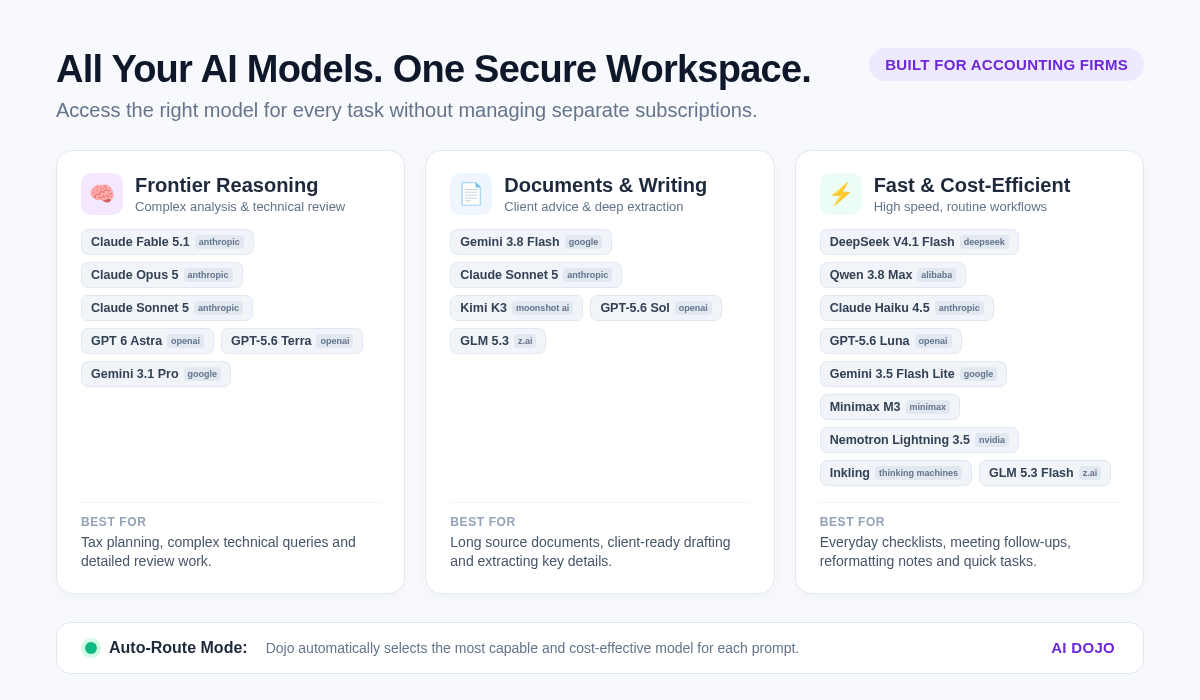
Expecting one AI model to excel across all of those tasks overlooks how these systems are built. Different models have distinct strengths:
- Structured reasoning: Analysing technical rules, identifying missing information in a client file, or preparing queries registers requires deep, step-by-step logic.
- Client communication: Turning complex tax legislation or technical adjustments into plain, reassuring client advice needs natural, clear phrasing that avoids robotic language.
- Data and documents: Working with trial balances, general ledger extracts, or lengthy source documentation demands models with large context windows that respect structured detail.
- Speed and cost: Everyday administrative tasks, such as formatting a meeting summary, preparing a checklist, or polishing an internal file note, do not warrant running a heavy, expensive reasoning model.
When a firm relies on only one provider, the team has to compromise. If the chosen tool is slow and heavy, routine admin drags out. If it is tuned mainly for conversational writing, it may stumble on detailed tax calculations or financial schedules.
When a tool does not perform well, staff naturally look for alternatives. They open individual accounts across Claude, ChatGPT, Gemini, or various open-source platforms.
What begins as an attempt to introduce AI usually turns into an unmanaged patchwork:
- Inconsistent work quality: Two accountants tackle the same task using different tools and produce completely different standards of output for senior review.
- Trapped knowledge: Prompts, templates, and lessons learned remain isolated in individual browser tabs rather than shared across the firm.
- Subscription creep: The practice ends up paying for scattered seat licences across multiple providers.
- Data privacy concerns: Individual use of consumer AI tools makes it difficult for partners to know where confidential client financial records are being pasted or stored.
Instead of creating capacity and reducing repetitive administration, single-model lock-in introduces friction, confusion, and rework for reviewers.
Access multiple models in one purpose-built workspace
Dojo resolves this problem by bringing multiple leading AI models into a single AI workspace designed specifically for Australian accounting firms.
Rather than forcing your firm to gamble on one platform and hope it fits every job, Dojo gives your team access to the model best suited to the task in front of them:
- Leading commercial models: Access top-tier models from Google, Anthropic, and OpenAI for deep technical synthesis, document review, and polished client correspondence.
- Efficient open-source options: Use fast, cost-effective models (including DeepSeek, Qwen, and others) for straightforward drafting, routine data extraction, and everyday tasks.
- Automatic model selection: Remove the guesswork by allowing the workspace to select the most capable and cost-effective model for the task automatically.
Because all of this happens within one unified environment, your team does not need multiple logins, open tabs, or personal expense claims. Everything sits behind firm-level access, consistent security controls, and Australian data hosting.
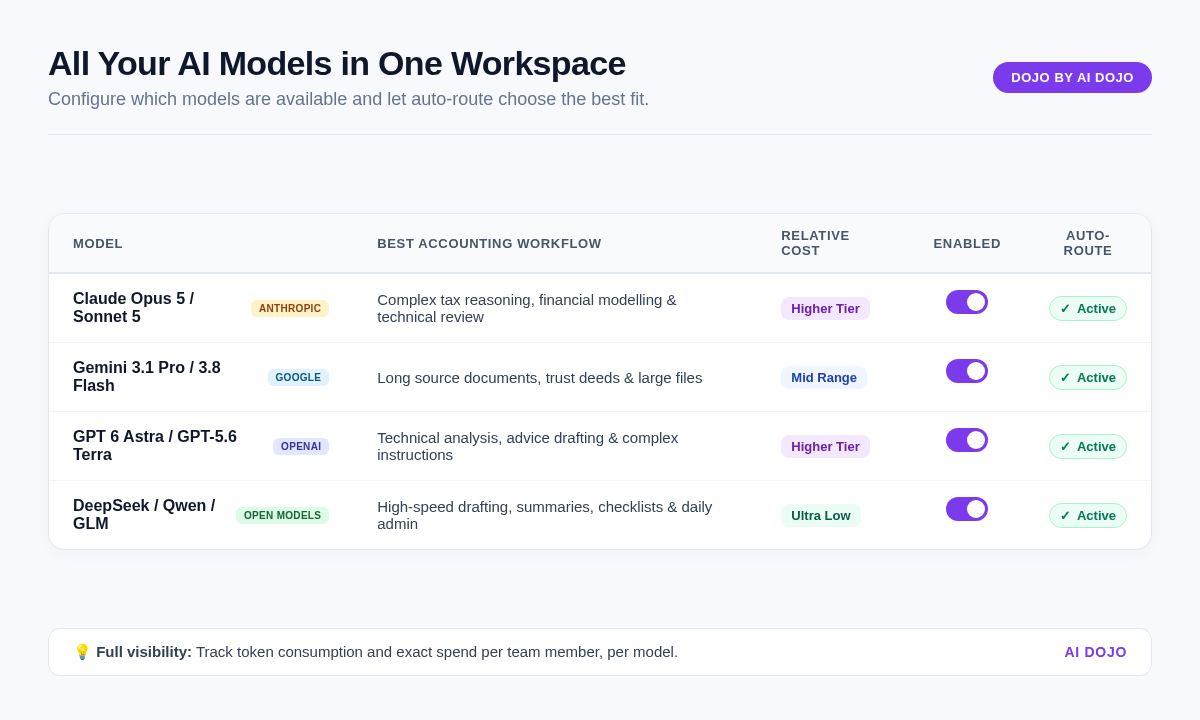
Available models
- Qwen 3.8 Max
- Claude Fable 5.1
- Claude Opus 5
- Claude Sonnet 5
- Claude Haiku 4.5
- DeepSeek V4.1 Flash
- Gemini 3.1 Pro
- Gemini 3.8 Flash
- Gemini 3.5 Flash Lite
- MiniMax M3
- Kimi K3
- Nemotron Lightning 3.5
- GPT 6 Astra
- GPT-5.6 Sol
- GPT-5.6 Terra
- GPT-5.6 Luna
- Inkling
- GLM 5.3
- GLM 5.3 Flash
What multiple models look like across everyday workflows
Having model choice inside a dedicated accounting workspace changes how work gets done across the practice.
Drafting clear, professional client emails
Turning technical tax matters into clear, empathetic communication is a daily requirement. Certain models excel at producing natural, approachable prose that avoids technical jargon. An accountant can generate a solid first draft of an information request, a fee proposal, or a tax planning summary in seconds. The accountant still reviews the figures and applies their judgement, but they never start from a blank screen.
Reviewing complex files and technical positions
When working through group structures, year-end adjustments, or tax planning scenarios, accountants need rigorous analysis. High-reasoning models can review facts, identify potential gaps in records, and help draft review points for a senior manager. Having access to more than one model also allows accountants to cross-check a conclusion, comparing how two different systems interpret a scenario before finalising a file note.
Summarising lengthy source documents
Accountants spend significant time reviewing source documents, from trust deeds and prior-year tax returns to ASIC company extracts. Models with large context windows can quickly scan lengthy files, extract key clauses or figures, and compile review checklists. That means less time spent manually locating data and more time evaluating the findings.
Keeping running costs sensible
Using a premium reasoning model to tidy up meeting notes or rewrite a short internal message is inefficient. With multiple models available, teams can use lightweight options for simple administrative tasks and reserve advanced models for complex technical work. Firms get the benefit of AI without paying premium rates for simple jobs.
Adapting as technology evolves
The AI market changes rapidly. A model that leads the industry today may be superseded in a few months.
For an accounting firm, trying to track every new release is unrealistic. If your practice commits to a single AI vendor, you risk getting stuck in an endless cycle of reviewing tools, negotiating contracts, retraining your team, and resetting your security protocols every time a better model arrives.
A multi-model workspace eliminates that disruption. As newer, faster, or more capable models become available, they are added directly to Dojo. Your team continues using the same interface, the same firm processes, and the same standard operating procedures. Your firm stays adaptable without having to constantly rebuild its technology stack.
More choice without unnecessary complexity
Giving your team model choice does not mean turning accountants into prompt engineers. They should not need to study the technical architecture of machine learning models to complete their work.
When multiple models are embedded inside an accounting-specific workspace with structured processes, team templates, and practical training, it simply means having the right tool ready for the job at hand.
The result is review-ready work, reduced administrative drag, and more capacity for client relationships and advisory services.
Frequently Asked Questions
Ready to give your practice more flexibility?
Dojo brings together multiple AI models, practical accounting processes, and hands-on training so your practice can adopt AI safely, practically, and with complete confidence.